

Email: [email protected]Phone: 1800 324 872
The StrengthErg & ErgData
22 July 2025
Share

The Concept2® StrengthErg™ uses air resistance to deliver a full-body strength workout that is both effective and safe. When you connect it with the ErgData® app, it becomes an even more powerful training tool. Whether you are training for performance, rehabilitation, sport-specific goals, or general fitness, the precise, data-rich feedback helps you train smarter, track progress, and stay motivated. Let’s look at how it can help you reach your goals.
What is ErgData?
ErgData is Concept2’s free app that connects via Bluetooth to all Concept2 Ergs- the StrengthErg, RowErg®, SkiErg®, and BikeErg®. It can be used to program workouts, displays real-time workout data, saves your sessions, and syncs automatically to the Concept2 Online Logbook.
When connected to the StrengthErg, ErgData helps you:
- Monitor force, work, reps, rep time, drive speed, time under tension, and much more
- Track progress over time
- Set measurable strength goals
- Record and compare workouts automatically
StrengthErg Metrics in ErgData
Here is an example of the ErgData screen for a Just Reps workout:
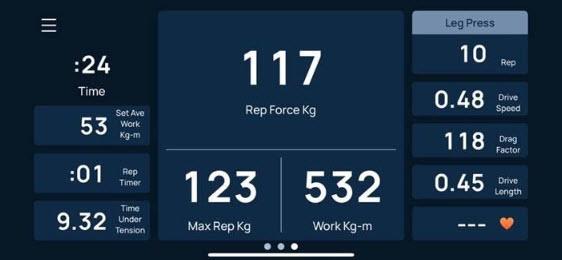
(Note that ErgData can be set to your choice of Kilograms or Pounds)
The three featured numbers in the middle of the screen show:
Rep Force (117 Kg) - This is the force that was exerted for the last rep. This can be measured in either kilograms or pounds.
Max Rep Force (123 Kg) – This is the maximum force applied for any rep in the set of 10. This can be measured in either kilograms or pounds.
Work (532 Kg-m) – The volume of work (force x distance) performed in the set of 10 reps. This is always measured in kilogram-meters.
The column on the right shows:
Leg Press – This is the movement selected by the user during the three rep warm up. This can be a custom movement or a preprogrammed movement (Leg Press, Chest Press, or Seated Row).
Reps (10) – This shows the number of reps performed in the set.
Drive Speed (0.48 m/s) – The speed the rep was performed in. The faster, or higher the drive speed is, the greater the force will be and the more resistance that will be felt. This is measured in meters per second. Drive speed is often used in velocity based training as an indicator of when you are approaching failure. If you are dropping below your target speed, you know you are approaching failure.
Drag Factor (118) – This is the rate the flywheel is decelerating. Each rep the PM uses the drag factor to determine from the speed of the flywheel acceleration and deceleration how much force is being applied and the work that is being performed. Learn more about drag factor for all Ergs here.
Drive Length (0.45m) – This is the length of the rep just performed. This can be dependent on the user’s leg and arm length. It is measured in meters.
Heart Rate – If you are using heart rate monitoring (HRM) devices, your beats per minute (BPM) will be advertised here. In this case, no HRM is in use, so no value is shown. HRM can be connected to all Ergs via Bluetooth.
Last, the column on the left shows:
Time (0:24) – This is the total time for your set of 10 reps. This is recorded in minutes and seconds.
Set Ave Work (53 Kg-m) – This is the average work performed for each rep in this set. The greater the force applied for each rep, the greater average work performed will be for each rep. This is always measured in kilogram-meters.
Rep Timer (0:01) – This is the amount of time the current rep has taken the user. This restarts for each rep when the push, press, or pull begins and will time out after 10 seconds have passed.
Time Under Tension (9.32 seconds) – This is the total time in seconds of loading that has occurred in this set. This will continue to go up after each rep. Greater time under tension during strength training increases muscle growth, strength, and endurance.
Not sure you need all that data while you work out? You can simplify the screen to show less information by swiping to one of the other displays. There are also a range of other data points available in ErgData. Simply tap one of the smaller cells at the side of the screen and you can select from a list of metric options.
Custom Movements
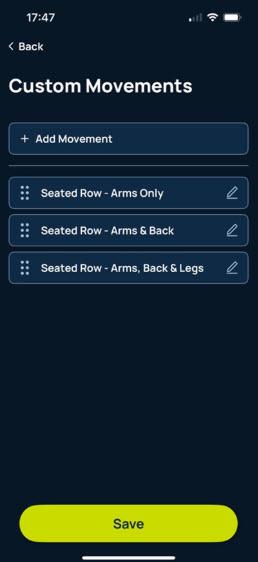
Custom movements in ErgData allow users to define and label exercises beyond the built-in presets of Leg Press, Chest Press, and Seated Row. Each rep is then tracked under the name of your chosen movement. For example, you might use three different movements for the Seated Row – arms only, arms and back, or arms, back, and legs. Or perhaps you have a wide-grip Chest Press and a narrow-grip Chest Press. Maybe you want to split your Leg Press between high and low drag. Whatever variations you use, ErgData allows you to create labels for them. This helps you:
- Track specific exercises over time, not just the preprogrammed movements.
- Segment workout data by specific movement type.
- Maintain consistency across sessions with repeatable labels.
- Better analyze performance by comparing metrics per variation.
When you select “Custom” in the ErgData app, you can enter a name for your movement, which will appear in your ErgData workout summary and be saved to the Concept2 Online Logbook. This enables more granular data tracking and insight into how you are performing across different movement types. Custom movements cannot be ranked.
Review Workouts and Track Progress
Reviewing previous StrengthErg workouts and tracking your progress on the StrengthErg is simple and easy with ErgData. After every workout, ErgData will:
- Save the workout automatically
- Display a detailed rep by rep analysis of your workout
- Show a summary log of the set or body of work
- Graphically illustrate the history of similar workouts for comparison (based on same reps, time, or work)
- Sync with the Concept2 Online Logbook
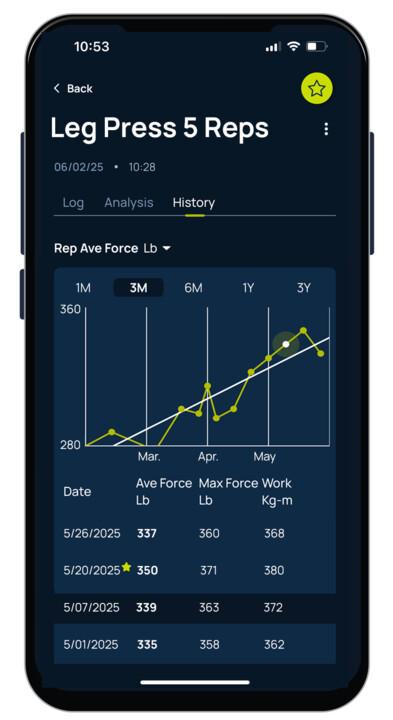
The combination of the StrengthErg and ErgData delivers data-backed strength training. Every rep of every set is recorded in detail. Whether you are a performance athlete or everyday user, the ability to target and track the data that is important to you allows for smarter sessions. And when your data syncs automatically to your personal Concept2 Logbook, every rep contributes to a bigger picture of your strength, fitness, and progress.
Recent Posts
Get Updates and Training Tips from Concept2
Tags: